 OpenAi-HK
gpt-4-vision-preview Model
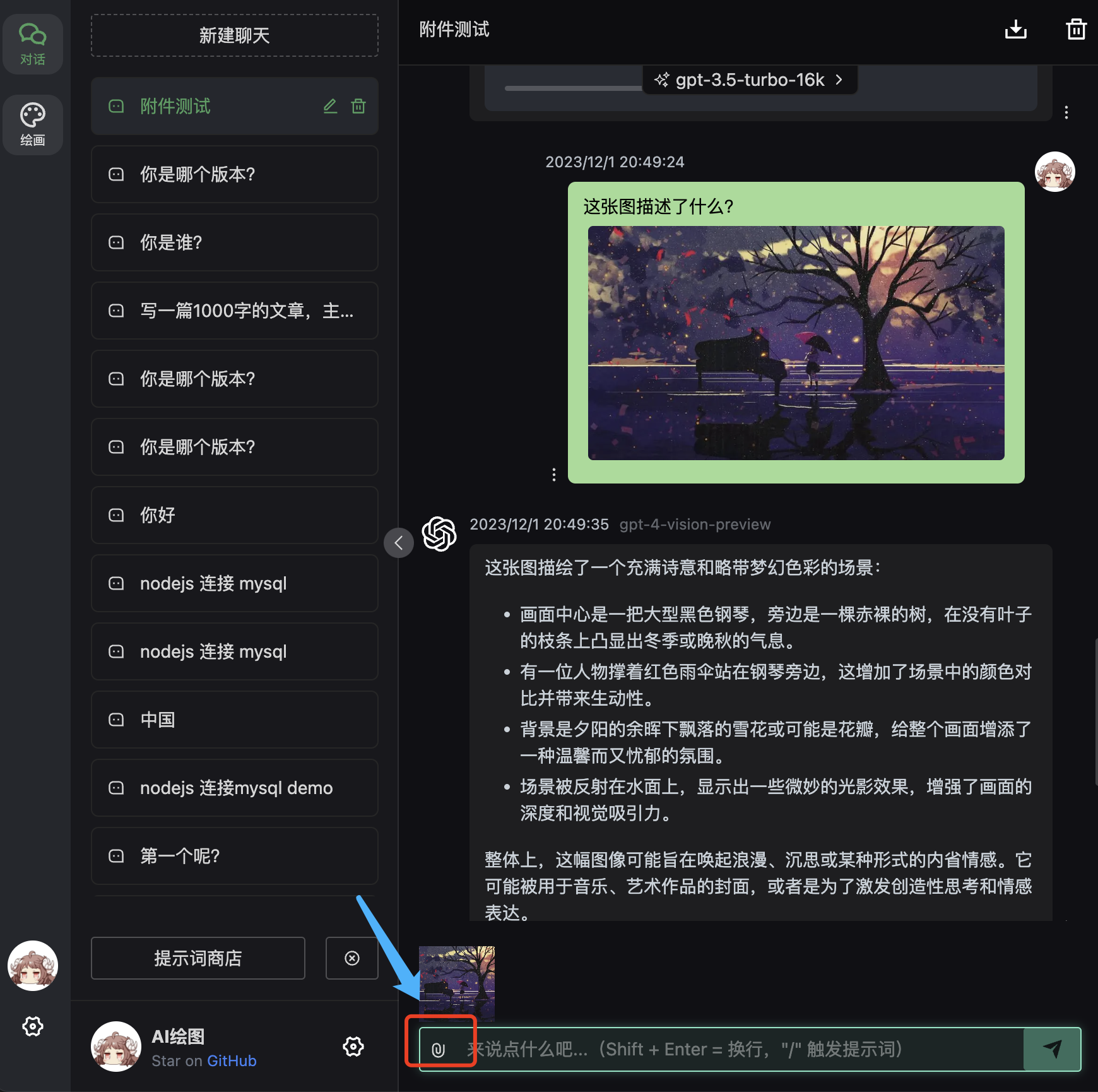
gpt-4-vision-preview can read and analyze images for you.
- It can generate webpage code from your images
- You can give it a medical image and ask it to suggest a prescription
- Note: this model has a 4k context window and incurs additional image fees
curl Example
Example of generating webpage code from an image. For other languages, ask ChatGPT to convert the example.
shell
curl  https://api.openai-hk.com/v1/chat/completions \
  -H 'Authorization: Bearer hk-replace-with-your-key' \
  -H "Content-Type: application/json" \
  -d '{
    "max_tokens": 1200,
    "model": "gpt-4-vision-preview",
    "messages": [
        {
            "role": "system",
            "content": "You are an expert Tailwind developer\nYou take screenshots of a reference web page from the user, and then build single page apps \nusing Tailwind, HTML and JS.\nYou might also be given a screenshot(The second image) of a web page that you have already built, and asked to\nupdate it to look more like the reference image(The first image).\n\n- Make sure the app looks exactly like the screenshot.\n- Pay close attention to background color, text color, font size, font family, \npadding, margin, border, etc. Match the colors and sizes exactly.\n- Use the exact text from the screenshot.\n- Do not add comments in the code such as \"<!-- Add other navigation links as needed -->\" and \"<!-- ... other news items ... -->\" in place of writing the full code. WRITE THE FULL CODE.\n- Repeat elements as needed to match the screenshot. For example, if there are 15 items, the code should have 15 items. DO NOT LEAVE comments like \"<!-- Repeat for each news item -->\" or bad things will happen.\n- For images, use placeholder images from https://placehold.co and include a detailed description of the image in the alt text so that an image generation AI can generate the image later.\n\nIn terms of libraries,\n\n- Use this script to include Tailwind: <script src=\"https://cdn.tailwindcss.com\"></script>\n- You can use Google Fonts\n- Font Awesome for icons: <link rel=\"stylesheet\" href=\"https://cdnjs.cloudflare.com/ajax/libs/font-awesome/5.15.3/css/all.min.css\"></link>\n\nReturn only the full code in <html></html> tags.\nDo not include markdown \"```\" or \"```html\" at the start or end."
        },
        {
            "role": "user",
            "content": [
                {
                    "type": "text",
                    "text": "Generate webpage code from the image"
                },
                {
                    "type": "image_url",
                    "image_url": {
                        "url": "data:image/jpeg;base64,xxxx=image-url-or-base64"
                    }
                }
            ]
        }
    ]
}'
curl https://api.openai-hk.com/v1/chat/completions \
-H 'Authorization: Bearer hk-replace-with-your-key' \
-H "Content-Type: application/json" \
-d '{
"max_tokens": 1200,
"model": "gpt-4-vision-preview",
"messages": [
{
"role": "system",
"content": "You are an expert Tailwind developer\nYou take screenshots of a reference web page from the user, and then build single page apps \nusing Tailwind, HTML and JS.\nYou might also be given a screenshot(The second image) of a web page that you have already built, and asked to\nupdate it to look more like the reference image(The first image).\n\n- Make sure the app looks exactly like the screenshot.\n- Pay close attention to background color, text color, font size, font family, \npadding, margin, border, etc. Match the colors and sizes exactly.\n- Use the exact text from the screenshot.\n- Do not add comments in the code such as \"<!-- Add other navigation links as needed -->\" and \"<!-- ... other news items ... -->\" in place of writing the full code. WRITE THE FULL CODE.\n- Repeat elements as needed to match the screenshot. For example, if there are 15 items, the code should have 15 items. DO NOT LEAVE comments like \"<!-- Repeat for each news item -->\" or bad things will happen.\n- For images, use placeholder images from https://placehold.co and include a detailed description of the image in the alt text so that an image generation AI can generate the image later.\n\nIn terms of libraries,\n\n- Use this script to include Tailwind: <script src=\"https://cdn.tailwindcss.com\"></script>\n- You can use Google Fonts\n- Font Awesome for icons: <link rel=\"stylesheet\" href=\"https://cdnjs.cloudflare.com/ajax/libs/font-awesome/5.15.3/css/all.min.css\"></link>\n\nReturn only the full code in <html></html> tags.\nDo not include markdown \"```\" or \"```html\" at the start or end."
},
{
"role": "user",
"content": [
{
"type": "text",
"text": "Generate webpage code from the image"
},
{
"type": "image_url",
"image_url": {
"url": "data:image/jpeg;base64,xxxx=image-url-or-base64"
}
}
]
}
]
}'Online Test
Note
- Visit https://gpt4v.ddaiai.com/ (If blocked, try changing the subdomain prefix to
suibian)
2. If it is blocked, you can change the address yourself: replacesuibianinhttps://suibian.ddaiai.comwith something else, e.g.https://2024.ddaiai.com— all variations work
Settings
Then configure the following fields in the screenshot below
OpenAi API Base URL: https://api.openai-hk.com
OpenAi API KEY: hk-your-apiKey
Then configure the following fields in the screenshot below
OpenAi API Base URL: https://api.openai-hk.com
OpenAi API KEY: hk-your-apiKey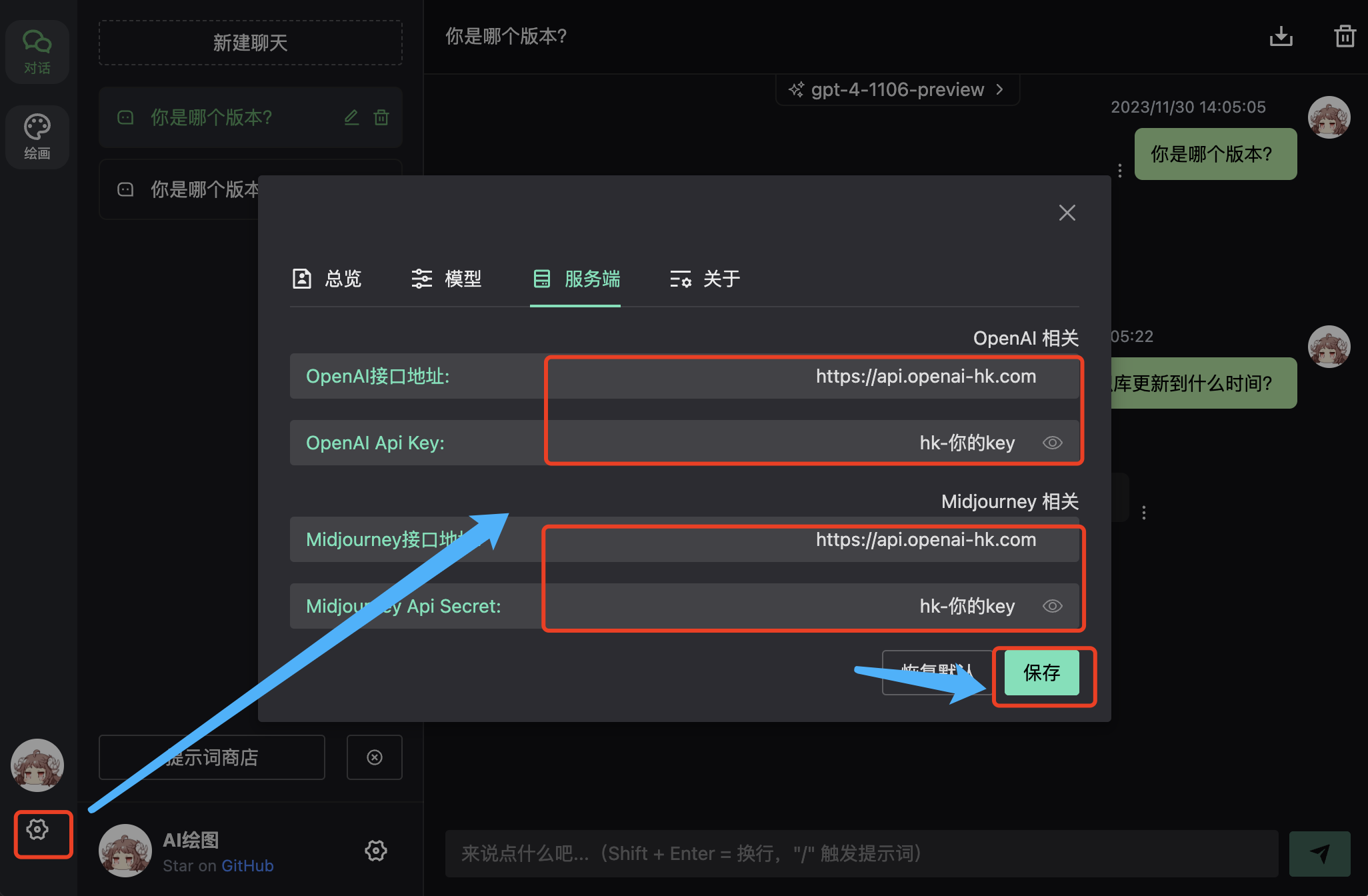
Preview
Input box for chat