 OpenAi-HK
Getting Started
OpenAI-HK currently provides OpenAI relay interface services such as GPT, Dall-e-3, gpt-4o, o1, o3, gpt-image-1, etc. A fee is required before calling.
OpenAI-HK also provides Suno, Flux, Midjourney, Google Veo3, Riffusion, and more, covering AI Music, AI Video, AI Image, and AI Chat services.
Official Reference (requires VPN)
How to Call
First, register an account at openai-hk;
After logging in, click [Get Key] to obtain your api-key;
Copy the api_key starting with
hk-returned by KEY, and replace the api_key in the original request header with our dedicated api_key.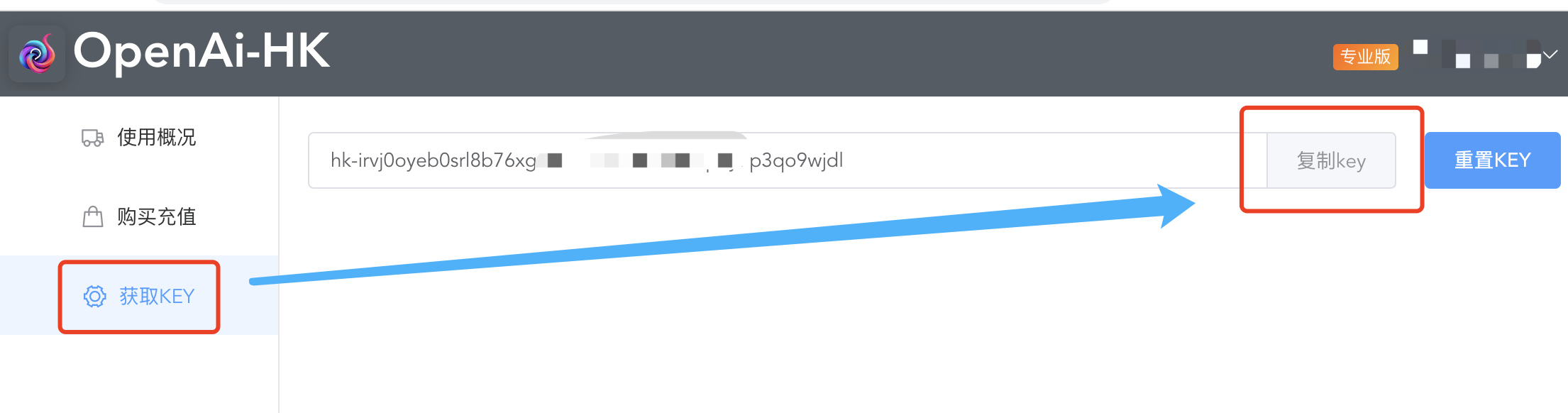 Example:
Original: sk-sdiL2SMN4D7GBqFhBsYdT2345kFJhwEHGXbU5RzCM8dS3lrn
Now: hk-wsvj0oyeb0srl8b76xgzolc678996mhwlk3p3y7p3qo9wjdl
OpenAI's api_key normally starts with
sk-, but our platform's api_key starts withhk-followed by a 48-character random string.Add
-hkafter the original request addressapi.openai.com, i.e.api.openai-hk.com.Example:
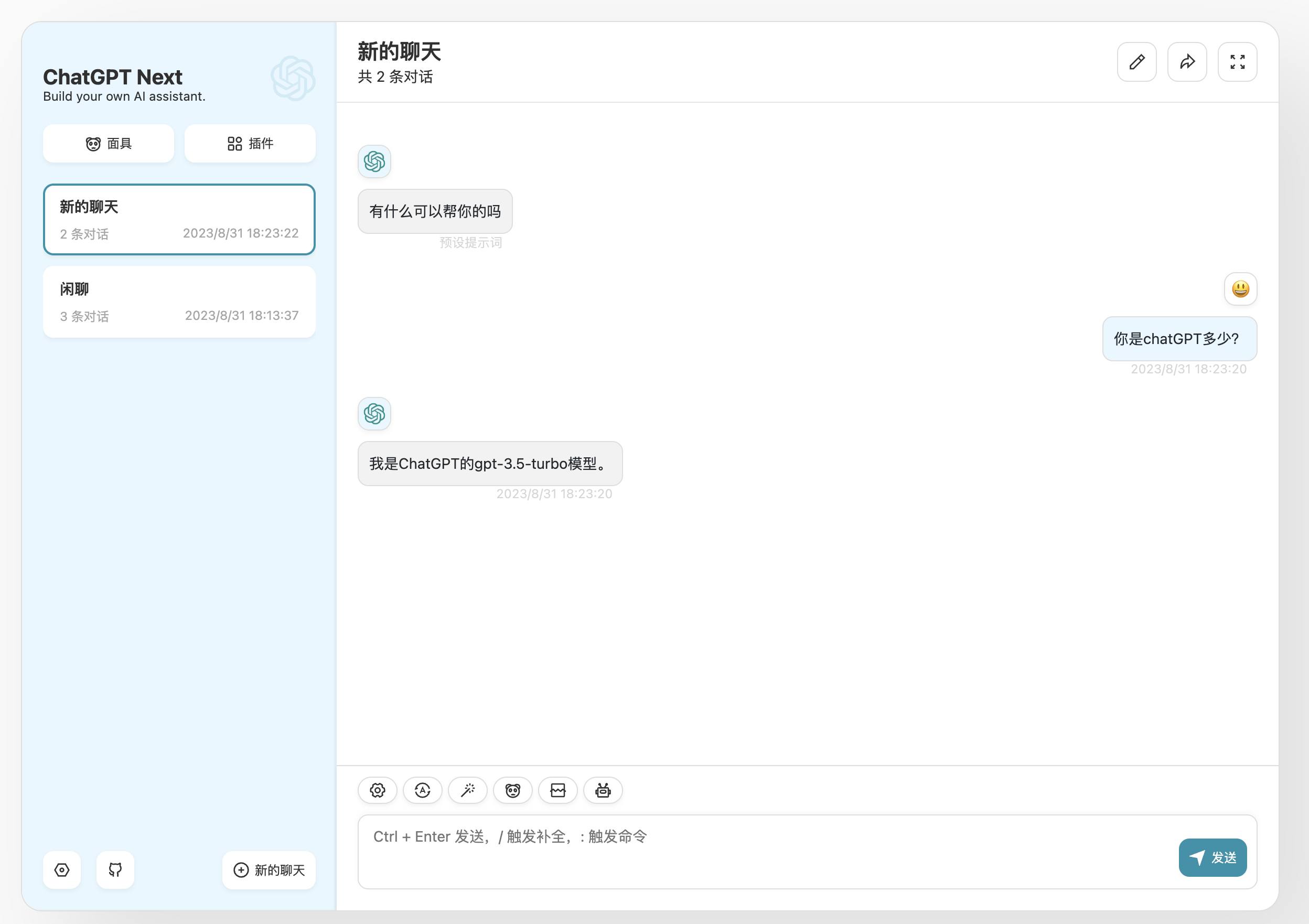
🔥 Chat Interface Examples
- The examples use the chat (v1/chat/completions) interface as a sample; the official API has many other types of results.
- For more chat interface parameters, please refer to the official documentation https://platform.openai.com/docs/api-reference/chat/create
- Below are multiple examples prepared for you.
CURL Example
curl --request POST \
  --url https://api.openai-hk.com/v1/chat/completions \
  --header 'Authorization: Bearer hk-替换为你的key' \
  -H "Content-Type: application/json" \
  --data '{
    "max_tokens": 1200,
    "model": "gpt-3.5-turbo",
    "temperature": 0.8,
    "top_p": 1,
    "presence_penalty": 1,
    "messages": [
        {
            "role": "system",
            "content": "You are ChatGPT, a large language model trained by OpenAI. Answer as concisely as possible."
        },
        {
            "role": "user",
            "content": "你是chatGPT多少?"
        }
    ]
}'
curl --request POST \
--url https://api.openai-hk.com/v1/chat/completions \
--header 'Authorization: Bearer hk-替换为你的key' \
-H "Content-Type: application/json" \
--data '{
"max_tokens": 1200,
"model": "gpt-3.5-turbo",
"temperature": 0.8,
"top_p": 1,
"presence_penalty": 1,
"messages": [
{
"role": "system",
"content": "You are ChatGPT, a large language model trained by OpenAI. Answer as concisely as possible."
},
{
"role": "user",
"content": "你是chatGPT多少?"
}
]
}'To call GPT-4.0, replace gpt-3.5-turbo in the model field above with gpt-4 or gpt-4-0613.
PHP Example
$ch = curl_init();

curl_setopt($ch, CURLOPT_URL, 'https://api.openai-hk.com/v1/chat/completions');
curl_setopt($ch, CURLOPT_RETURNTRANSFER, 1);
curl_setopt($ch, CURLOPT_POST, 1);

$headers = array();
$headers[] = 'Content-Type: application/json';
$headers[] = 'Authorization: Bearer hk-替换为你的key';
curl_setopt($ch, CURLOPT_HTTPHEADER, $headers);

$data = array(
    'max_tokens' => 1200,
    'model' => 'gpt-3.5-turbo',
    'temperature' => 0.8,
    'top_p' => 1,
    'presence_penalty' => 1,
    'messages' => array(
        array(
            'role' => 'system',
            'content' => 'You are ChatGPT, a large language model trained by OpenAI. Answer as concisely as possible.'
        ),
        array(
            'role' => 'user',
            'content' => '你是chatGPT多少?'
        )
    )
);

$data_string = json_encode($data);

curl_setopt($ch, CURLOPT_POSTFIELDS, $data_string);

$result = curl_exec($ch);

if (curl_errno($ch)) {
    echo 'Error:' . curl_error($ch);
}

curl_close($ch);

echo $result;
$ch = curl_init();

curl_setopt($ch, CURLOPT_URL, 'https://api.openai-hk.com/v1/chat/completions');
curl_setopt($ch, CURLOPT_RETURNTRANSFER, 1);
curl_setopt($ch, CURLOPT_POST, 1);

$headers = array();
$headers[] = 'Content-Type: application/json';
$headers[] = 'Authorization: Bearer hk-替换为你的key';
curl_setopt($ch, CURLOPT_HTTPHEADER, $headers);

$data = array(
    'max_tokens' => 1200,
    'model' => 'gpt-3.5-turbo',
    'temperature' => 0.8,
    'top_p' => 1,
    'presence_penalty' => 1,
    'messages' => array(
        array(
            'role' => 'system',
            'content' => 'You are ChatGPT, a large language model trained by OpenAI. Answer as concisely as possible.'
        ),
        array(
            'role' => 'user',
            'content' => '你是chatGPT多少?'
        )
    )
);

$data_string = json_encode($data);

curl_setopt($ch, CURLOPT_POSTFIELDS, $data_string);

$result = curl_exec($ch);

if (curl_errno($ch)) {
    echo 'Error:' . curl_error($ch);
}

curl_close($ch);

echo $result;To call GPT-4.0, replace gpt-3.5-turbo in the model field above with gpt-4 or gpt-4-0613.
Python Example
import requests
import json

url = "https://api.openai-hk.com/v1/chat/completions"

headers = {
    "Content-Type": "application/json",
    "Authorization": "Bearer hk-替换为你的key"
}

data = {
    "max_tokens": 1200,
    "model": "gpt-3.5-turbo",
    "temperature": 0.8,
    "top_p": 1,
    "presence_penalty": 1,
    "messages": [
        {
            "role": "system",
            "content": "You are ChatGPT, a large language model trained by OpenAI. Answer as concisely as possible."
        },
        {
            "role": "user",
            "content": "你是chatGPT多少?"
        }
    ]
}

response = requests.post(url, headers=headers, data=json.dumps(data).encode('utf-8') )
result = response.content.decode("utf-8")

print(result)
import requests
import json
url = "https://api.openai-hk.com/v1/chat/completions"
headers = {
"Content-Type": "application/json",
"Authorization": "Bearer hk-替换为你的key"
}
data = {
"max_tokens": 1200,
"model": "gpt-3.5-turbo",
"temperature": 0.8,
"top_p": 1,
"presence_penalty": 1,
"messages": [
{
"role": "system",
"content": "You are ChatGPT, a large language model trained by OpenAI. Answer as concisely as possible."
},
{
"role": "user",
"content": "你是chatGPT多少?"
}
]
}
response = requests.post(url, headers=headers, data=json.dumps(data).encode('utf-8') )
result = response.content.decode("utf-8")
print(result)To call GPT-4.0, replace gpt-3.5-turbo in the model field above with gpt-4 or gpt-4-0613.
javascript Example
const axios = require("axios");

const url = "https://api.openai-hk.com/v1/chat/completions";
const headers = {
  "Content-Type": "application/json",
  Authorization: "Bearer hk-替换为你的key",
};

const data = {
  max_tokens: 1200,
  model: "gpt-3.5-turbo",
  temperature: 0.8,
  top_p: 1,
  presence_penalty: 1,
  messages: [
    {
      role: "system",
      content:
        "You are ChatGPT, a large language model trained by OpenAI. Answer as concisely as possible.",
    },
    {
      role: "user",
      content: "你是chatGPT多少?",
    },
  ],
};

axios
  .post(url, data, { headers })
  .then((response) => {
    const result = response.data;
    console.log(result);
  })
  .catch((error) => {
    console.error(error);
  });
const axios = require("axios");
const url = "https://api.openai-hk.com/v1/chat/completions";
const headers = {
"Content-Type": "application/json",
Authorization: "Bearer hk-替换为你的key",
};
const data = {
max_tokens: 1200,
model: "gpt-3.5-turbo",
temperature: 0.8,
top_p: 1,
presence_penalty: 1,
messages: [
{
role: "system",
content:
"You are ChatGPT, a large language model trained by OpenAI. Answer as concisely as possible.",
},
{
role: "user",
content: "你是chatGPT多少?",
},
],
};
axios
.post(url, data, { headers })
.then((response) => {
const result = response.data;
console.log(result);
})
.catch((error) => {
console.error(error);
});To call GPT-4.0, replace gpt-3.5-turbo in the model field above with gpt-4 or gpt-4-0613.
typescript Example
import axios from "axios";

const url = "https://api.openai-hk.com/v1/chat/completions";
const headers = {
  "Content-Type": "application/json",
  Authorization: "Bearer hk-替换为你的key",
};

const data = {
  max_tokens: 1200,
  model: "gpt-3.5-turbo",
  temperature: 0.8,
  top_p: 1,
  presence_penalty: 1,
  messages: [
    {
      role: "system",
      content:
        "You are ChatGPT, a large language model trained by OpenAI. Answer as concisely as possible.",
    },
    {
      role: "user",
      content: "你是chatGPT多少?",
    },
  ],
};

axios
  .post(url, data, { headers })
  .then((response) => {
    const result = response.data;
    console.log(result);
  })
  .catch((error) => {
    console.error(error);
  });
import axios from "axios";
const url = "https://api.openai-hk.com/v1/chat/completions";
const headers = {
"Content-Type": "application/json",
Authorization: "Bearer hk-替换为你的key",
};
const data = {
max_tokens: 1200,
model: "gpt-3.5-turbo",
temperature: 0.8,
top_p: 1,
presence_penalty: 1,
messages: [
{
role: "system",
content:
"You are ChatGPT, a large language model trained by OpenAI. Answer as concisely as possible.",
},
{
role: "user",
content: "你是chatGPT多少?",
},
],
};
axios
.post(url, data, { headers })
.then((response) => {
const result = response.data;
console.log(result);
})
.catch((error) => {
console.error(error);
});To call GPT-4.0, replace gpt-3.5-turbo in the model field above with gpt-4 or gpt-4-0613.
java Example
import okhttp3.*;

import java.io.IOException;

public class OpenAIChat {

    public static void main(String[] args) throws IOException {
        String url = "https://api.openai-hk.com/v1/chat/completions";

        OkHttpClient client = new OkHttpClient();

        MediaType mediaType = MediaType.parse("application/json");

        String json = "{\n" +
                "  \"max_tokens\": 1200,\n" +
                "  \"model\": \"gpt-3.5-turbo\",\n" +
                "  \"temperature\": 0.8,\n" +
                "  \"top_p\": 1,\n" +
                "  \"presence_penalty\": 1,\n" +
                "  \"messages\": [\n" +
                "    {\n" +
                "      \"role\": \"system\",\n" +
                "      \"content\": \"You are ChatGPT, a large language model trained by OpenAI. Answer as concisely as possible.\"\n" +
                "    },\n" +
                "    {\n" +
                "      \"role\": \"user\",\n" +
                "      \"content\": \"你是chatGPT多少?\"\n" +
                "    }\n" +
                "  ]\n" +
                "}";

        RequestBody body = RequestBody.create(mediaType, json);
        Request request = new Request.Builder()
                .url(url)
                .post(body)
                .addHeader("Content-Type", "application/json")
                .addHeader("Authorization", "Bearer hk-替换为你的key")
                .build();

        Call call = client.newCall(request);
        Response response = call.execute();
        String result = response.body().string();
        System.out.println(result);
    }

}
import okhttp3.*;
import java.io.IOException;
public class OpenAIChat {
public static void main(String[] args) throws IOException {
String url = "https://api.openai-hk.com/v1/chat/completions";
OkHttpClient client = new OkHttpClient();
MediaType mediaType = MediaType.parse("application/json");
String json = "{\n" +
" \"max_tokens\": 1200,\n" +
" \"model\": \"gpt-3.5-turbo\",\n" +
" \"temperature\": 0.8,\n" +
" \"top_p\": 1,\n" +
" \"presence_penalty\": 1,\n" +
" \"messages\": [\n" +
" {\n" +
" \"role\": \"system\",\n" +
" \"content\": \"You are ChatGPT, a large language model trained by OpenAI. Answer as concisely as possible.\"\n" +
" },\n" +
" {\n" +
" \"role\": \"user\",\n" +
" \"content\": \"你是chatGPT多少?\"\n" +
" }\n" +
" ]\n" +
"}";
RequestBody body = RequestBody.create(mediaType, json);
Request request = new Request.Builder()
.url(url)
.post(body)
.addHeader("Content-Type", "application/json")
.addHeader("Authorization", "Bearer hk-替换为你的key")
.build();
Call call = client.newCall(request);
Response response = call.execute();
String result = response.body().string();
System.out.println(result);
}
}To call GPT-4.0, replace gpt-3.5-turbo in the model field above with gpt-4 or gpt-4-0613.
go Example
package main

import (
	"bytes"
	"encoding/json"
	"fmt"
	"net/http"
)

func main() {
	url := "https://api.openai-hk.com/v1/chat/completions"
	apiKey := "hk-替换为你的key"

	payload := map[string]interface{}{
		"max_tokens":        1200,
		"model":             "gpt-3.5-turbo",
		"temperature":       0.8,
		"top_p":             1,
		"presence_penalty":  1,
		"messages": []map[string]string{
			{
				"role":    "system",
				"content": "You are ChatGPT, a large language model trained by OpenAI. Answer as concisely as possible.",
			},
			{
				"role":    "user",
				"content": "你是chatGPT多少?",
			},
		},
	}

	jsonPayload, err := json.Marshal(payload)
	if err != nil {
		fmt.Println("Error encoding JSON payload:", err)
		return
	}

	req, err := http.NewRequest("POST", url, bytes.NewBuffer(jsonPayload))
	if err != nil {
		fmt.Println("Error creating HTTP request:", err)
		return
	}

	req.Header.Set("Authorization", "Bearer "+apiKey)
	req.Header.Set("Content-Type", "application/json")

	client := &http.Client{}
	resp, err := client.Do(req)
	if err != nil {
		fmt.Println("Error making API request:", err)
		return
	}
	defer resp.Body.Close()

	// Handle the response
	// Parse and process the response data according to your actual needs
	fmt.Println("Response HTTP Status:", resp.StatusCode)
}
package main
import (
"bytes"
"encoding/json"
"fmt"
"net/http"
)
func main() {
url := "https://api.openai-hk.com/v1/chat/completions"
apiKey := "hk-替换为你的key"
payload := map[string]interface{}{
"max_tokens": 1200,
"model": "gpt-3.5-turbo",
"temperature": 0.8,
"top_p": 1,
"presence_penalty": 1,
"messages": []map[string]string{
{
"role": "system",
"content": "You are ChatGPT, a large language model trained by OpenAI. Answer as concisely as possible.",
},
{
"role": "user",
"content": "你是chatGPT多少?",
},
},
}
jsonPayload, err := json.Marshal(payload)
if err != nil {
fmt.Println("Error encoding JSON payload:", err)
return
}
req, err := http.NewRequest("POST", url, bytes.NewBuffer(jsonPayload))
if err != nil {
fmt.Println("Error creating HTTP request:", err)
return
}
req.Header.Set("Authorization", "Bearer "+apiKey)
req.Header.Set("Content-Type", "application/json")
client := &http.Client{}
resp, err := client.Do(req)
if err != nil {
fmt.Println("Error making API request:", err)
return
}
defer resp.Body.Close()
// Handle the response
// Parse and process the response data according to your actual needs
fmt.Println("Response HTTP Status:", resp.StatusCode)
}To call GPT-4.0, replace gpt-3.5-turbo in the model field above with gpt-4 or gpt-4-0613.
🚀 JS SSE Typing Effect
Note
Can be run on a Node.js backend; also supports browser mode. Note that if used on the frontend, be careful to protect your key.
How to protect your key? You can work with nginx to place the 'Authorization': 'Bearer hk-your-key' header part inside nginx.
//remember to import `axios`
const chatGPT = (msg, opt) => {
  let content = "";
  const dataPar = (data) => {
    let rz = {};
    let dz = data.split("data:", 2);
    const str = dz[1].trim();
    if (str == "[DONE]") rz = { finish: true, text: "" };
    else {
      rz = JSON.parse(str);
      rz.text = rz.choices[0].delta.content;
    }
    return rz;
  };
  const dd = (data) => {
    let arr = data.trim().split("\n\n");
    let rz = { text: "", arr: [] };
    const atext = arr.map((v) => {
      const aa = dataPar(v);
      return aa.text;
    });
    rz.arr = atext;
    rz.text = atext.join("");
    if (opt.onMessage) opt.onMessage(rz);
    return rz;
  };
  return new Promise((resolve, reject) => {
    axios({
      method: "post",
      url: "https://api.openai-hk.com/v1/chat/completions",
      data: {
        max_tokens: 1200,
        model: "gpt-3.5-turbo", //model replacement: to call 4.0, change to gpt-4 or gpt-4-0613
        temperature: 0.8,
        top_p: 1,
        presence_penalty: 1,
        messages: [
          {
            role: "system",
            content: opt.system ?? "You are ChatGPT",
          },
          {
            role: "user",
            content: msg,
          },
        ],
        stream: true, //output as data stream
      },
      headers: {
        "Content-Type": "application/json",
        Authorization: "Bearer hk-your-key",
      },
      onDownloadProgress: (e) => dd(e.target.responseText),
    })
      .then((d) => resolve(dd(d.data)))
      .catch((e) => reject(e));
  });
};

//call
chatGPT("Who are you?", {
  //system:'', //role definition
  onMessage: (d) => console.log("Intermediate result:", d.text),
})
  .then((d) => console.log("✅Final result:", d))
  .catch((e) => console.log("❎Error:", e));
//remember to import `axios`
const chatGPT = (msg, opt) => {
let content = "";
const dataPar = (data) => {
let rz = {};
let dz = data.split("data:", 2);
const str = dz[1].trim();
if (str == "[DONE]") rz = { finish: true, text: "" };
else {
rz = JSON.parse(str);
rz.text = rz.choices[0].delta.content;
}
return rz;
};
const dd = (data) => {
let arr = data.trim().split("\n\n");
let rz = { text: "", arr: [] };
const atext = arr.map((v) => {
const aa = dataPar(v);
return aa.text;
});
rz.arr = atext;
rz.text = atext.join("");
if (opt.onMessage) opt.onMessage(rz);
return rz;
};
return new Promise((resolve, reject) => {
axios({
method: "post",
url: "https://api.openai-hk.com/v1/chat/completions",
data: {
max_tokens: 1200,
model: "gpt-3.5-turbo", //model replacement: to call 4.0, change to gpt-4 or gpt-4-0613
temperature: 0.8,
top_p: 1,
presence_penalty: 1,
messages: [
{
role: "system",
content: opt.system ?? "You are ChatGPT",
},
{
role: "user",
content: msg,
},
],
stream: true, //output as data stream
},
headers: {
"Content-Type": "application/json",
Authorization: "Bearer hk-your-key",
},
onDownloadProgress: (e) => dd(e.target.responseText),
})
.then((d) => resolve(dd(d.data)))
.catch((e) => reject(e));
});
};
//call
chatGPT("Who are you?", {
//system:'', //role definition
onMessage: (d) => console.log("Intermediate result:", d.text),
})
.then((d) => console.log("✅Final result:", d))
.catch((e) => console.log("❎Error:", e));😁 Embeddings Interface
Request URL: POST https://api.openai-hk.com/v1/embeddings
node.js request example
const fetch = require("node-fetch");

fetch("https://api.openai-hk.com/v1/embeddings", {
  method: "POST",
  headers: {
    Authorization: "Bearer hk-替换为你的key",
    "Content-Type": "application/json",
  },
  body: JSON.stringify({
    input: "一起来使用ChatGPT",
    model: "text-embedding-ada-002",
  }),
});
const fetch = require("node-fetch");
fetch("https://api.openai-hk.com/v1/embeddings", {
method: "POST",
headers: {
Authorization: "Bearer hk-替换为你的key",
"Content-Type": "application/json",
},
body: JSON.stringify({
input: "一起来使用ChatGPT",
model: "text-embedding-ada-002",
}),
});😁 Moderations Interface
Request URL: POST https://api.openai-hk.com/v1/moderations
node.js request example
const fetch = require("node-fetch");

fetch("https://api.openai-hk.com/v1/moderations", {
  method: "POST",
  headers: {
    Authorization: "Bearer hk-替换为你的key",
    "Content-Type": "application/json",
  },
  body: JSON.stringify({ input: "有人砍我" }),
});
const fetch = require("node-fetch");
fetch("https://api.openai-hk.com/v1/moderations", {
method: "POST",
headers: {
Authorization: "Bearer hk-替换为你的key",
"Content-Type": "application/json",
},
body: JSON.stringify({ input: "有人砍我" }),
});😁 Various Applications
There are many applications in the real world — choose one you like.
chatgpt-web
Docker start, default model is gpt-3.5
docker run --name chatgpt-web -d -p 6011:3002 \
--env OPENAI_API_KEY=hk-替换为你的key \
--env TIMEOUT_MS=600000  --env OPENAI_MAX_TOKEN=1000 \
--env OPENAI_API_BASE_URL=https://api.openai-hk.com  chenzhaoyu94/chatgpt-web
docker run --name chatgpt-web -d -p 6011:3002 \
--env OPENAI_API_KEY=hk-替换为你的key \
--env TIMEOUT_MS=600000 --env OPENAI_MAX_TOKEN=1000 \
--env OPENAI_API_BASE_URL=https://api.openai-hk.com chenzhaoyu94/chatgpt-webThen visit http://127.0.0.1:6011
chatgpt-web gpt-4
The default model is gpt-3.5. How to start with a default model of gpt-4.0? Use the environment variable OPENAI_API_MODEL.
docker run --name chatgpt-web -d -p 6040:3002 \
--env OPENAI_API_KEY=hk-替换为你的key \
--env TIMEOUT_MS=600000  --env OPENAI_MAX_TOKEN=1000 \
--env OPENAI_API_MODEL=gpt-4-0613 \
--env OPENAI_API_BASE_URL=https://api.openai-hk.com  chenzhaoyu94/chatgpt-web
docker run --name chatgpt-web -d -p 6040:3002 \
--env OPENAI_API_KEY=hk-替换为你的key \
--env TIMEOUT_MS=600000 --env OPENAI_MAX_TOKEN=1000 \
--env OPENAI_API_MODEL=gpt-4-0613 \
--env OPENAI_API_BASE_URL=https://api.openai-hk.com chenzhaoyu94/chatgpt-webThen visit http://127.0.0.1:6040
Available Models
| Model | Description |
|---|---|
| gpt-3.5-turbo-0613 | 3.5 with 4k context support |
| gpt-3.5-turbo-16k-0613 | 3.5 with 16k context support for longer contexts, slightly more expensive than regular 3.5 |
| gpt-3.5-turbo-1106 | 3.5 with 16k context, same price as 3.5 4k |
| gpt-4 | 4.0 with 8k context support |
| gpt-4-0613 | The 0613 version of 4.0 |
| gpt-4-1106-preview | 4.0 with 128k context, priced at half the cost of regular gpt-4 |
| gpt-4-vision-preview | Same token pricing as gpt-4-1106-preview, supports 4k, with additional fees for images |
| dall-e-3 | OpenAI's image generation model |
| Midjourney | Non-OpenAI image generation product |
See the effect 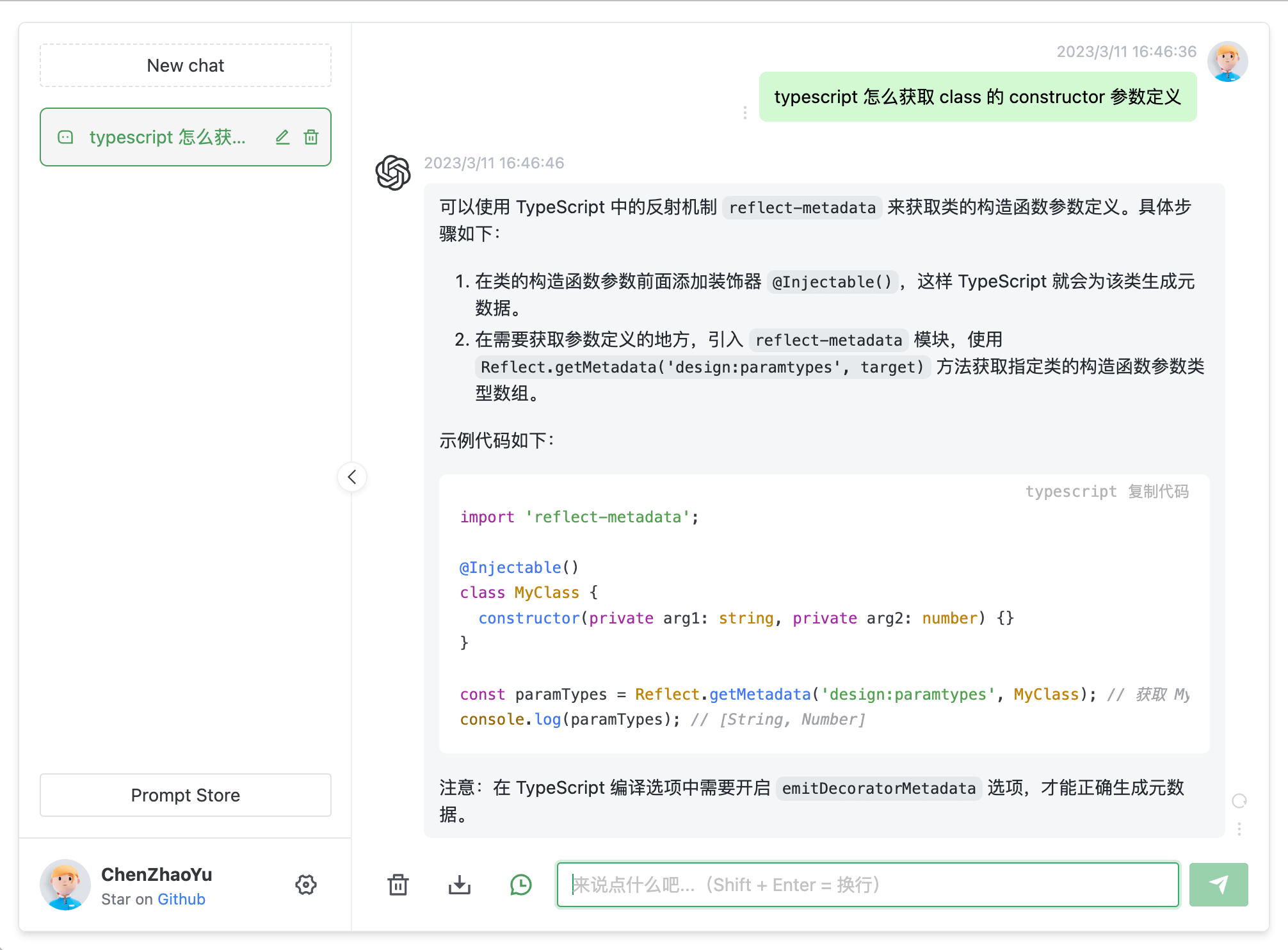
chatgpt-next-web
docker run  --name chatgpt-next-web   -d -p 6013:3000 \
   -e OPENAI_API_KEY="hk-替换为你的key" \
   -e BASE_URL=https://api.openai-hk.com   yidadaa/chatgpt-next-web
docker run --name chatgpt-next-web -d -p 6013:3000 \
-e OPENAI_API_KEY="hk-替换为你的key" \
-e BASE_URL=https://api.openai-hk.com yidadaa/chatgpt-next-webThen visit http://127.0.0.1:6013
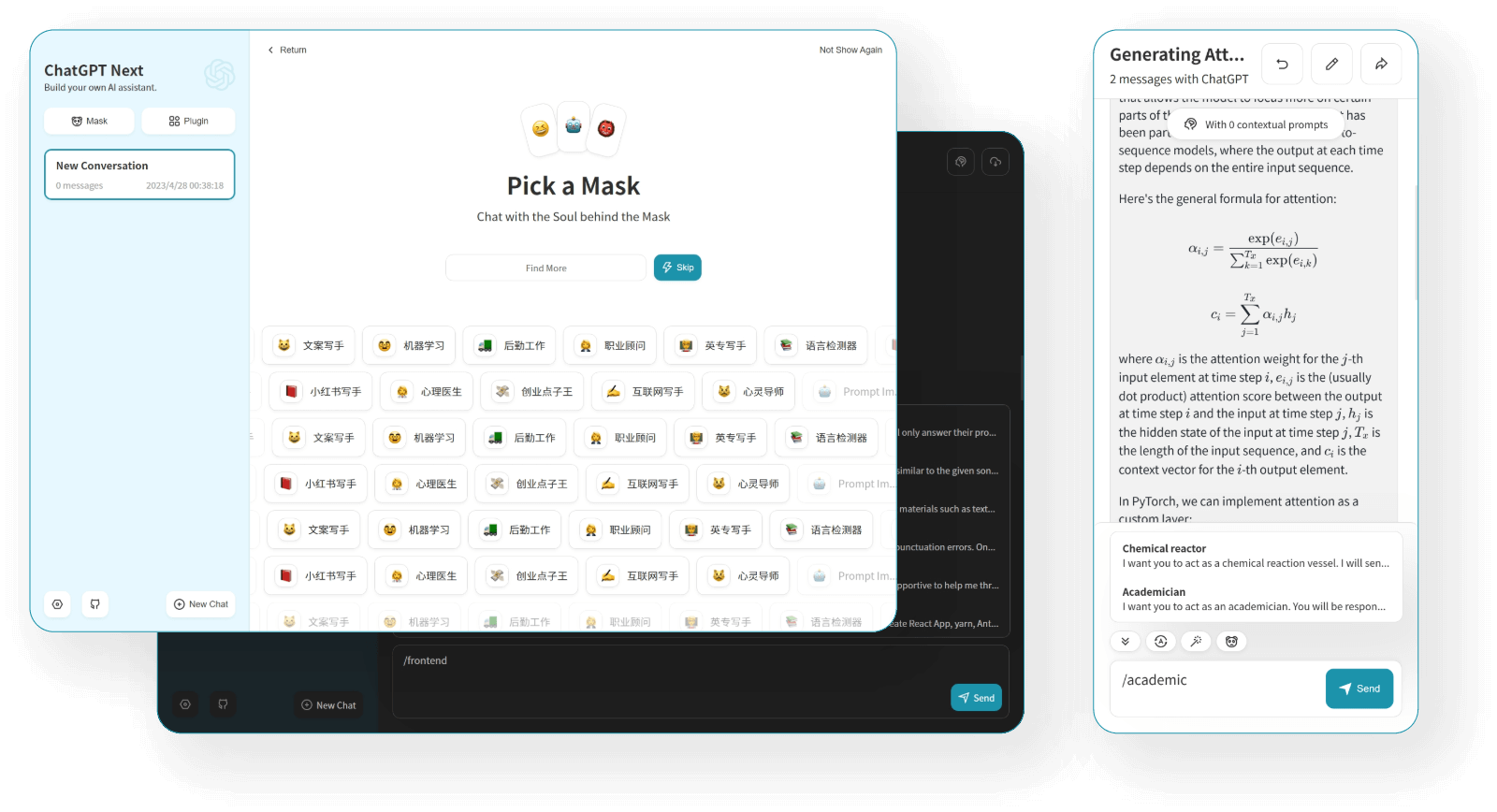
See the effect
Other
If you need other applications, please contact our customer service for assistance.
🚀 Direct Use
1. ChatGPT Web with Multiple Model Switching
Note 1. Visit https://chat.ddaiai.com/ (if blocked, replace the subdomain chat with hi)
2. If you find it's blocked, you can change the address yourself — https://hello.ddaiai.com — replace hello with anything else, e.g. https://202312.ddaiai.com, and it will still work.
Settings
Then set up the following in the corresponding fields as shown in the image below:
OpenAi API address: https://api.openai-hk.com
OpenAi API KEY: hk-yourApiKey

If you want to generate images, also complete the Midjourney information:
Midjourney API address: https://api.openai-hk.com
Midjourney API Secret: hk-yourApiKey
Then set up the following in the corresponding fields as shown in the image below:
OpenAi API address: https://api.openai-hk.com
OpenAi API KEY: hk-yourApiKey
If you want to generate images, also complete the Midjourney information:
Midjourney API address: https://api.openai-hk.com
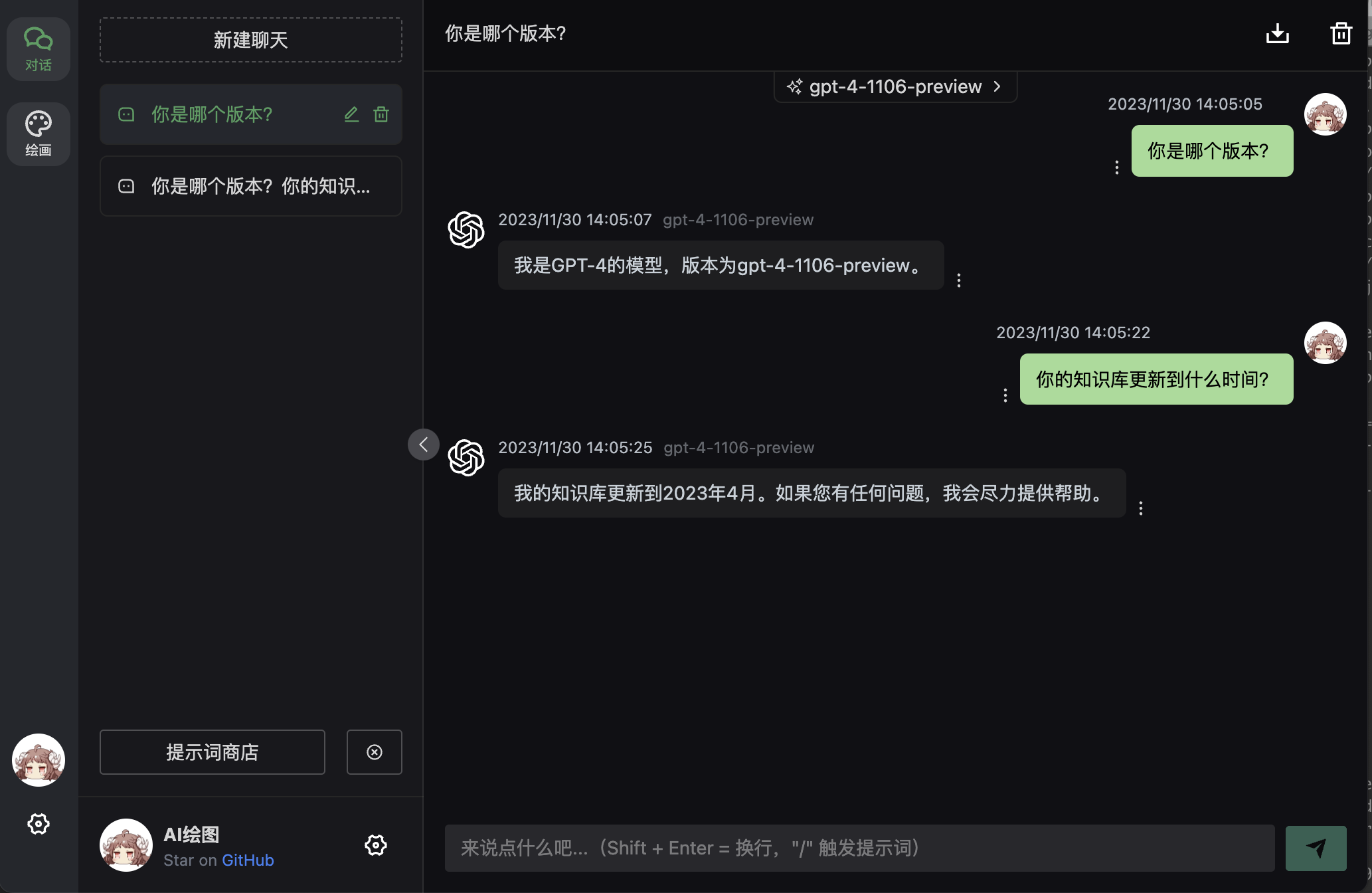
Midjourney API Secret: hk-yourApiKey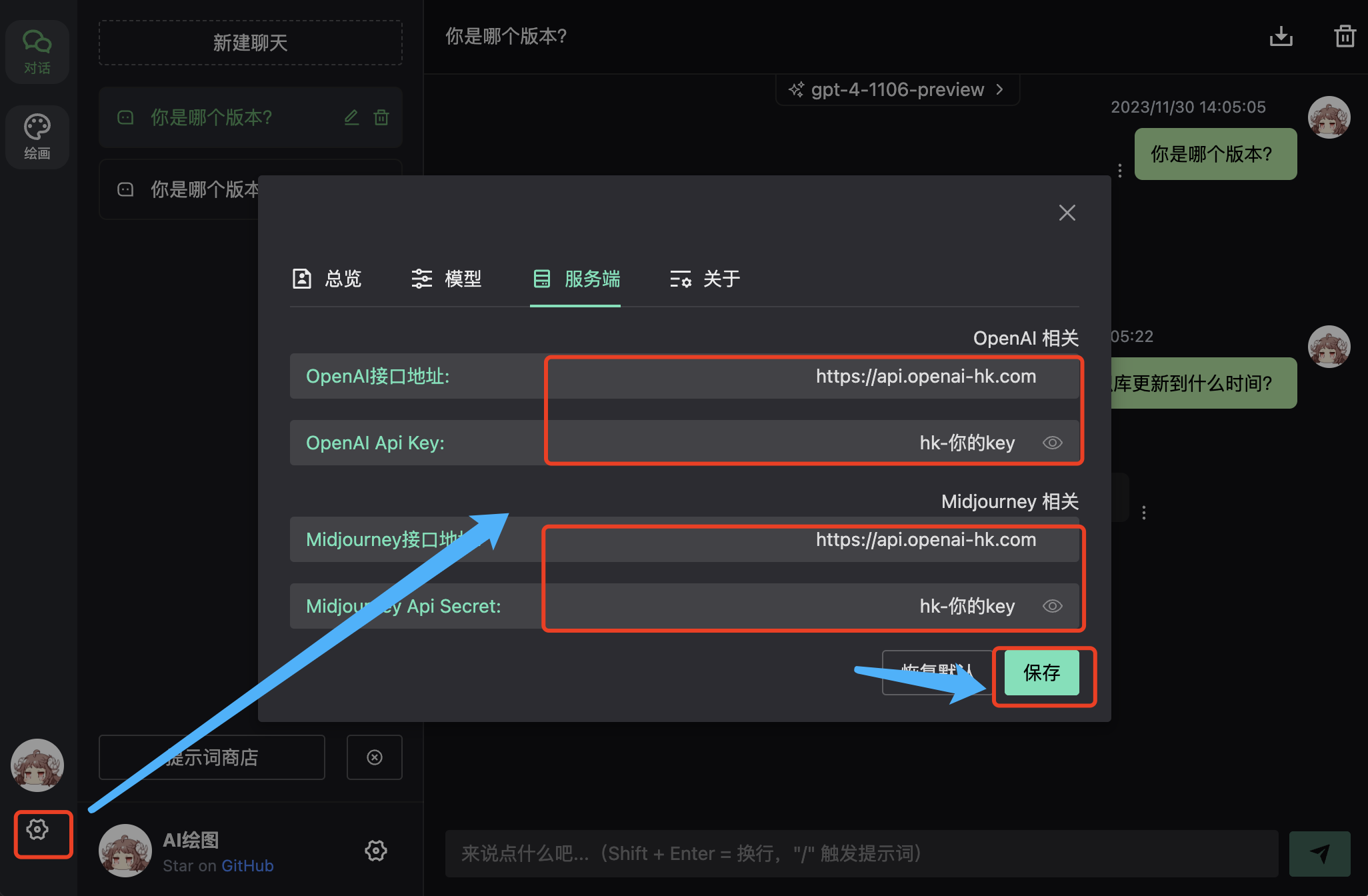 Result
Input box for questions and dialogue
Model Switching Supports custom models, multiple models can be separated by commas 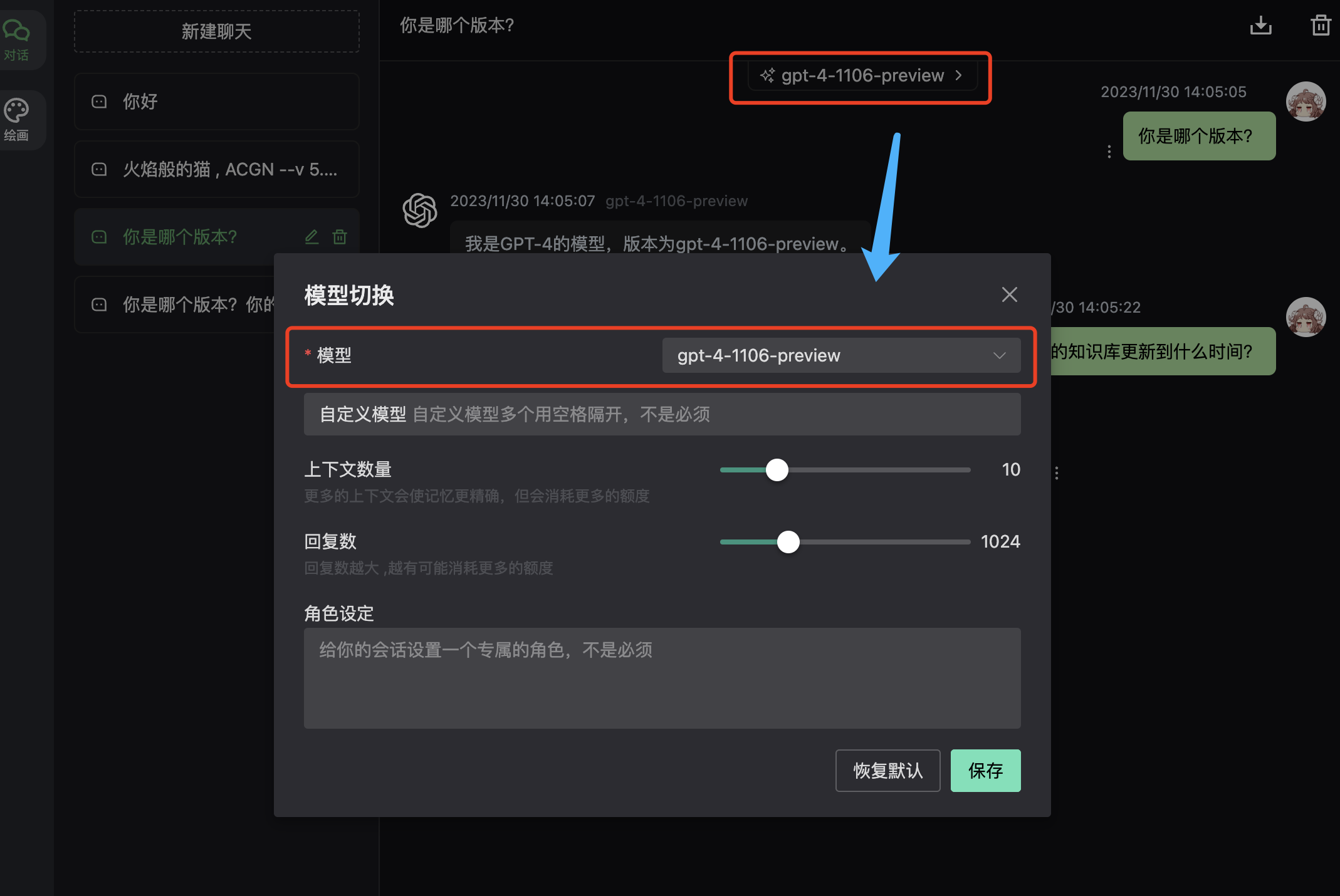
2. Next-Web with Multiple Model Switching
Note 1. Visit https://web.ccaiai.com/ (requires VPN)
2. If you find it's blocked, you can change the address yourself — https://suibian.ccaiai.com — replace suibian with anything else, e.g. https://abc.ccaiai.com, and it will still work.
Then set up the following in the corresponding fields as shown in the image below:
API address: https://api.openai-hk.com
API KEY: hk-yourApiKey
Model: Select GPT-4
Then set up the following in the corresponding fields as shown in the image below:
API address: https://api.openai-hk.com
API KEY: hk-yourApiKey
Model: Select GPT-4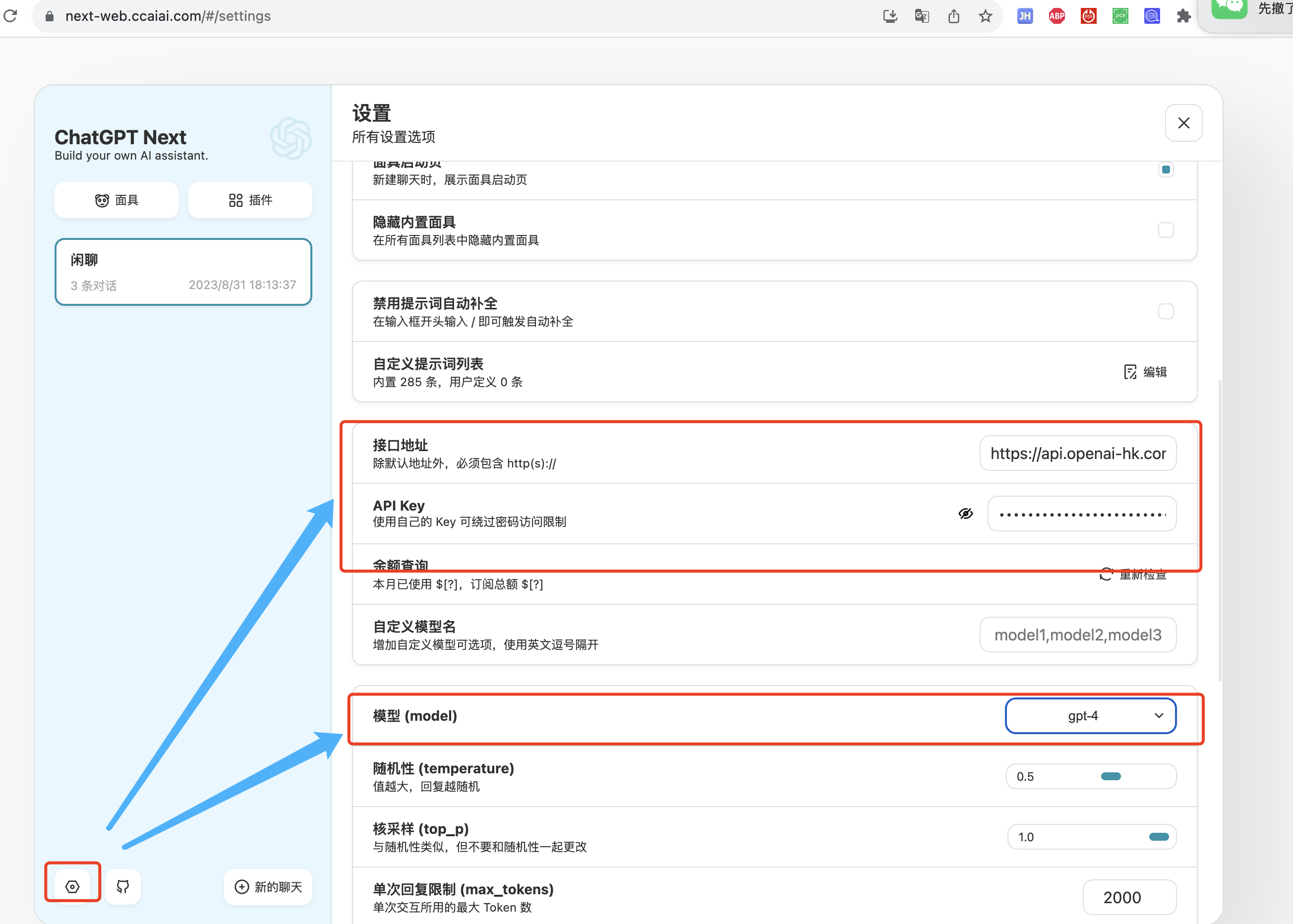
Input box for questions and dialogue